

Cart

Picture this: You’re in the middle of an important video call, ready to impress your boss or a client with your sharp ideas, and suddenly, *bam*, the dreaded "connection lost" message appears. You scramble, your heart races, and you wonder if you’ll ever be able to recover. We've all been there! But don't worry, there are ways to make sure this nightmare never happens again. Whether you’re a digital nomad or working from your home office, connectivity issues don’t have to ruin your day.
One moment you’re on a smooth video call, and the next, you’re frozen like a deer in headlights, with your coworkers looking confused. This happens when the Wi-Fi signal is weak or overloaded. The good news? There are a few easy tricks to keep you connected and avoid embarrassing moments!
Nothing feels worse than a laggy connection. If you’re using Wi-Fi, ensure it’s fast enough for video calls. Consider upgrading to a higher speed plan if your current one can’t handle the load. But remember, the speed is only part of the equation – quality matters too!
Wi-Fi is convenient, but it’s not always reliable, especially in big homes or crowded places. To avoid that dreaded “buffering” circle, plug into your router directly with an Ethernet cable. It’s like giving your call a VIP pass – no interruptions, no lag.
If you’re in a remote area, position yourself closer to the router. The closer you are, the better your connection. A small change in location could make a huge difference in your connection speed. Also, avoid placing your router near thick walls or metal objects that might block the signal.
Who doesn't love binge-watching Netflix or downloading large files? But when it’s time for an important call, make sure others in the household aren’t draining your bandwidth. Ask family members to pause streaming or heavy downloads so you can enjoy a smooth call.
Sometimes, even the best Wi-Fi fails us. That’s when having a backup plan comes in handy. Use your mobile hotspot as a backup internet source. This can save the day when the Wi-Fi decides to take a break. Just make sure your phone’s data plan has enough juice to handle the load!
It’s always a great idea to test your setup ahead of time. A quick “pre-call” will allow you to spot any potential connectivity issues before they turn into a disaster. Check your microphone, video, and internet connection to make sure everything is good to go.
Outdated software can contribute to poor performance. Ensure your video calling software, operating system, and drivers are all up-to-date to avoid unexpected crashes or glitches during your meeting.
Now that you know how to avoid connectivity issues during those important remote calls, you can say goodbye to freezes, lag, and embarrassing moments. With a little preparation, you’ll be able to keep your calls smooth and professional every time. Stay connected, stay confident!

Stellen Sie sich eine Welt vor, in der die Weihnachtsfeierlichkeiten nicht am 25. Dezember enden. Nein, señ...

Eine Fiesta auf Ihrem Teller: Die herzhaften Geheimnisse der mexikanischen Küche Stellen Sie sich vor, S...
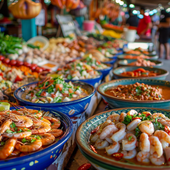
Begeben Sie sich auf ein kulinarisches Abenteuer: Die Wunder mexikanischer Meeresfrüchte Stellen Sie sic...

Begeben Sie sich auf ein kulinarisches Abenteuer: Exotische mexikanische Gerichte, die Ihren Gaumen kitzeln...

Entfesseln Sie die festliche Wut: Ultimative Vorräte für Ihre El Día De La Raza-Party! Stellen Sie sich ...

Willkommen im heiligen Schrein des Humors, wo wir Spiritualität mit einer Prise Witz verbinden. Heute tauch...
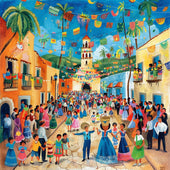
Seid gegrüßt, ihr Neugierigen und Festtagsliebhaber! Heute tauchen wir mit dem Löffel voran in eine Traditi...

„Bringen Sie Ihre Party auf ein neues Niveau: Entdecken Sie die aufregende Welt der Piñata-Stick- und Augenbind...

Eine Fiesta mit musikalischem Twist Versammelt euch, ihr Fiesta-Fans, für den seltsamsten und entzückend...

Der große Guacamole-Streich: Die Liebe zur mexikanischen Küche entdecken Wenn es etwas auf dieser Welt g...

Eine geschmackvolle Fiesta: Entdecken Sie die gastronomischen Köstlichkeiten eines mexikanischen Buffets Habe...
¡Ay, Caramba! Vergessen Sie das Zerschlagen Ihrer gewöhnlichen, im Laden gekauften Piñatas; es ist Zeit, ko...
Entfesseln Sie die Fiesta Ihrer Mode: Die Schürzen-Edition Denken Sie darüber nach. Wie oft haben Sie sc...
Bringen Sie an diesem Cinco de Mayo Schwung in die Sache In der herrlichen Symphonie klirrender Gläser u...

Meine Damen und Herren, Jungen und Mädchen, machen Sie sich bereit für eine farbenfrohe Reise ins Herz der ...
Hola amigos y amigas! Seid ihr bereit, euren Sombrero aufzusetzen und eure Maracas zu schütteln? Cinco de M...

Das süßeste Dekor: Verwandeln Sie Ihr Zuhause mit Agave Stellen Sie sich vor, Sie schlendern durch die G...
Die ultimative Fiesta: Bringen Sie mit traditioneller mexikanischer Musik Rhythmus in Ihr Familientreffen ...
Der seltsame Fall der Dankeskarten zum mexikanischen Familientreffen Stellen Sie sich einen heißen, sonni...
Das große Guacamole-Treffen: Peppen Sie Ihr mexikanisches Familientreffen auf Stellen Sie sich Folgendes...
Entdecken Sie die Aromen Mexikos: In jedem Gutschein erwarten Sie würzige Geheimnisse! Willkommen, kulina...
Das bunte Rätsel: Die Welt der Piñatas enträtseln! Stellen Sie sich eine Welt ohne Piñatas vor. Geburtsta...
Ein Fest der Stoffe und Fransen: Der unverzichtbare Leitfaden für die mexikanische Kleidung! Willkommen,...
Packen Sie die Fiesta aus: Partygeschenke mit einer pikanten Note! Willkommen, Amigos und Amigas, zum ul...
Haben Sie schon einmal eine Margarita direkt aus einem Kaktusglas getrunken, während im Hintergrund fröhlic...
Ein Schwebefest: Ballons für El Grito! Stellen Sie sich Folgendes vor: Der Himmel ist so glänzend dunke...
Heiliger Maulwurf, was ist der Grito de Dolores? Hallo, Geschichtsinteressierte und Fiesta-Fans! Wurden ...
Bumm! Zischen! Knallen! Ah, die Symphonie des mexikanischen Unabhängigkeitstag-Feuerwerks, ein akustischer ...
Der blühende Kampf der Blumenzwiebeln: Ein farbenfrohes Rätsel Treten Sie ein, meine Damen und Herren, in...
Die Geheimnisse altehrwürdiger Traditionen entschlüsseln Willkommen, neugierige Seelen und Kulturliebhab...
Entfesseln Sie Ihre innere Fiesta mit verrückten Fotoautomaten-Requisiten! Stellen Sie sich vor: Sie sin...
Lasst die Fiesta beginnen: Eine fotografische Reise durch die Feste der indigenen Völker Mexikos Meine Da...
Entfesseln Sie den Koch in sich mit antiken Aromen: Ein Vorgeschmack auf das indigene Mexiko Stellen Sie ...
Die umfassende Palette kultureller Ausdrucksformen Stellen Sie sich vor: Sie blättern durch endlose Seit...
Oh je, schnappen Sie sich Ihren Sombrero und einen Espresso, denn Sie brauchen beide Hände frei, um die wund...
Haben Sie sich schon einmal zu einer Dinnerparty gesetzt, auf den Tisch geblickt und gedacht: „Junge, ich w...
Klar doch! Los geht’s: Der Rhythmus der Tradition: Erkundung des lebendigen musikalischen Erbes Mexikos ...
Meine Damen, Herren und alle, die Fiestas lieben, lehnen Sie sich näher heran, denn wir werden gleich die f...
Schätze ausgraben: Die wunderliche Welt des einheimischen mexikanischen Kunsthandwerks Nehmen Sie sich e...
Meine Damen und Herren, halten Sie Ihre Tacos zurück und machen Sie sich bereit für eine pyrotechnische Rei...
Seien wir ehrlich, Amigos und Amigas – wenn es darum geht, eine Fiesta aufzupeppen, schreit kaum etwas so s...
Wenn der Himmel funkelt: Den Fuego mit einem Kichern und einer Schnalle umarmen Waren Sie schon einmal au...
Der explosive Charme des mexikanischen Nachthimmels Wenn Mexikos bezaubernde Landschaften und pikante ku...
Die Fäden der Zeit entwirren mit Postern der indigenen Bevölkerung Mexikos Warum sollten die alten ägypt...
Willkommen, neugierige Leser, in der wunderbaren Welt des Wohlbefindens, wo alte Weisheit auf modernes Gelä...
Bringen Sie Glanz in die Nacht Stellen Sie sich Folgendes vor: Sie sind zu Hause, die Uhr schlägt die St...
Die Wunderkerzen-Debatte: Warum Indoor-Feuerwerke so was von gestern sind Stellen Sie sich Folgendes vor...
Explodierende Spannung: Warum Ihre Party ein Feuerwerk braucht Stellen Sie sich Folgendes vor: Sie sind ...
Meine Damen, Herren und Pyrotechnik-Fans jeden Alters, kommen Sie her! Haben Sie genug von den immer gleich...
Seien wir ehrlich: Das Einzige, was das schimmernde Feuerwerksspektakel noch übertrifft, ist die Sicherheit...

💖 Spüren Sie den Geist der Fiesta mit LA AGUILA 💖 Manche Shirts sind nur Stoff – aber dieses hier? Es ist ein Symbol für Ihr Erbe,...
Vollständige Details anzeigen
🦅 Erleben Sie den Geist der Freiheit mit LA ÁGUILA 🦅 Manche Shirts fangen einen Moment ein. Aber dieses hier? Es ist eine Hommage ...
Vollständige Details anzeigen
💖 Breite deine Flügel aus mit La Águila 💖 Manche Shirts sind einfach nur Designs – aber dieses hier? Es ist dein Geist, deine Kult...
Vollständige Details anzeigen
💖 Spüren Sie den Geist der Tradition, erleben Sie den Spaß 💖 Jedes Spiel von Lotería weckt Erinnerungen – Lachen, Wettbewerb und j...
Vollständige Details anzeigen
💖 Feiere deine Herkunft mit einem kühnen Twist 💖 Es gibt ein ganz besonderes Gefühl, wenn man etwas trägt, das mehr als nur Stoff ...
Vollständige Details anzeigen
💖 Eine Erinnerung zum Festhalten 💖 Manche Shirts sind einfach nur Kleidung – aber dieses hier? Es ist du. Es ist deine Geschichte,...
Vollständige Details anzeigen
💖 Entfessle den Geist des Adlers 💖 Dies ist nicht nur ein T-Shirt. Dies ist deine Chance, das Symbol für Stärke, Freiheit und St...
Vollständige Details anzeigen
💖 Fliegen Sie hoch mit einem Stück Tradition 💖 Manche Shirts sind einfach nur Kleidung – aber dieses hier? Es ist Ihre Verbindung ...
Vollständige Details anzeigen
💖 Spüren Sie den Geist der Freiheit bei jedem Tragen 💖 Manche Shirts sind mehr als nur Stoff – sie tragen Geschichten, Kultur und...
Vollständige Details anzeigen
💖 Entfessle deine innere Wissenschaftlerin / deinen inneren Wissenschaftler 💖 Man sagt, die Wissenschaft sei eine eigene Welt – ei...
Vollständige Details anzeigen
💖 Aus Liebe zur Wissenschaft und zum Stil 💖 Manche T-Shirts sind einfach nur Kleidung, aber dieses hier? Es ist eine Feier dessen,...
Vollständige Details anzeigen
💜 Entfessle deine Superkraft mit Stil! 💜 An manchen Tagen muss man den Zyniker in sich einfach gewähren lassen. Und jetzt kannst d...
Vollständige Details anzeigen
💖 Trage deinen Vibe, lebe deine Kultur 💖 Manche Shirts sind einfach nur Shirts – aber dieses hier? Es ist deine Geschichte, zum Le...
Vollständige Details anzeigen
💖 Dein Vibe, Dein Lotería 💖 Stell dir vor, du betrittst einen Raum und spürst, dass alle Augen auf dich gerichtet sind. Nicht, wei...
Vollständige Details anzeigen
💖 Entfessle deine innere Ikone 💖 Manche Shirts sind einfach nur Kleidung, aber dieses hier? Es ist ein Statement. Eine mutige Misc...
Vollständige Details anzeigen
💖 Dein Herz, Deine Geschichte, Dein Stolz 💖 Manche Shirts sind einfach nur Shirts, aber dieses hier? Es ist mehr. Es ist deine per...
Vollständige Details anzeigen
💖 Dein Stil, Deine Geschichte 💖 Jedes Design hat eine Geschichte – aber dieses hier? Es ist eine Feier deiner selbst, eingehüllt i...
Vollständige Details anzeigen
💖 Die Magie von Nostalgie und Kultur vereint 💖 Manche Shirts sind einfach nur Kleidung – aber dieses hier? Es ist dein Erbe. Es is...
Vollständige Details anzeigen
💖 Trage deine Geschichte, lebe dein Erbe 💖 Jedes Design erzählt eine Geschichte, doch manche gehen noch tiefer. Stell dir vor, du ...
Vollständige Details anzeigen
💖 Dein neues Lieblings-T-Shirt 💖 Manche Shirts sind nur Kleidung – aber dieses hier? Es ist du. Es ist deine Geschichte, dein Vibe...
Vollständige Details anzeigen
💖 Ihre Geschichte, in jeden Faden eingewebt 💖 Stellen Sie sich vor, Sie tragen etwas, das Ihr Wesen, Ihre Herkunft und Ihre Gesch...
Vollständige Details anzeigen
💖 Dein neues Lieblingsshirt wartet auf dich 💖 Hast du jemals ein Shirt gefunden, das sich anfühlt, als wäre es nur für dich gemach...
Vollständige Details anzeigen
💖 Deine Geschichte, dein Stil 💖 Manche Shirts sind einfach nur Kleidung – aber dieses hier? Es ist ein Spiegelbild von dir. Es erz...
Vollständige Details anzeigen
💖 Deine Herkunft, Deine Geschichte, Dein Stil 💖 Manche Shirts sind mehr als nur Kleidung – sie sind ein Spiegelbild dessen, wer d...
Vollständige Details anzeigen English


Einen Kommentar hinterlassen